Universal Installer for Android - Install APK, XAPK, APKS Files Easily
Introduction
A while ago, while sorting through the installation packages on my phone, I ran into an annoying problem – many of the APKs downloaded from app stores weren't the usual .apk files, but rather split‑package formats like .apks, .xapk, and .apkm. The system's built‑in installer couldn't handle them at all, and I had to either find a dedicated split‑merging tool or download the app again from a different store – it took quite a bit of fiddling each time. Then I stumbled upon Universal Installer while browsing GitHub, gave it a try, and found that it could handle almost every Android package format out there. The interface is also pleasantly polished, so I bookmarked it on the spot.
Why Recommend It
Android's built‑in installer can only deal with plain .apk files, but distribution channels have diversified a lot these days. Many app stores now split an application into multiple package files – bundled as .apks, .xapk, .apkm, etc. – either to bypass size limits or to optimise delivery. When you download from third‑party platforms like APKMirror or APKPure, you often run into the issue that the system installer simply doesn't recognise the file. Universal Installer solves exactly this – it's like a "universal key" that can recognise and install any Android package, regardless of format. It also supports downloading packages directly from URLs, silent installation via Shizuku, integrated VirusTotal scanning, and more – features that are incredibly useful for anyone who frequently tinkers with their Android device.
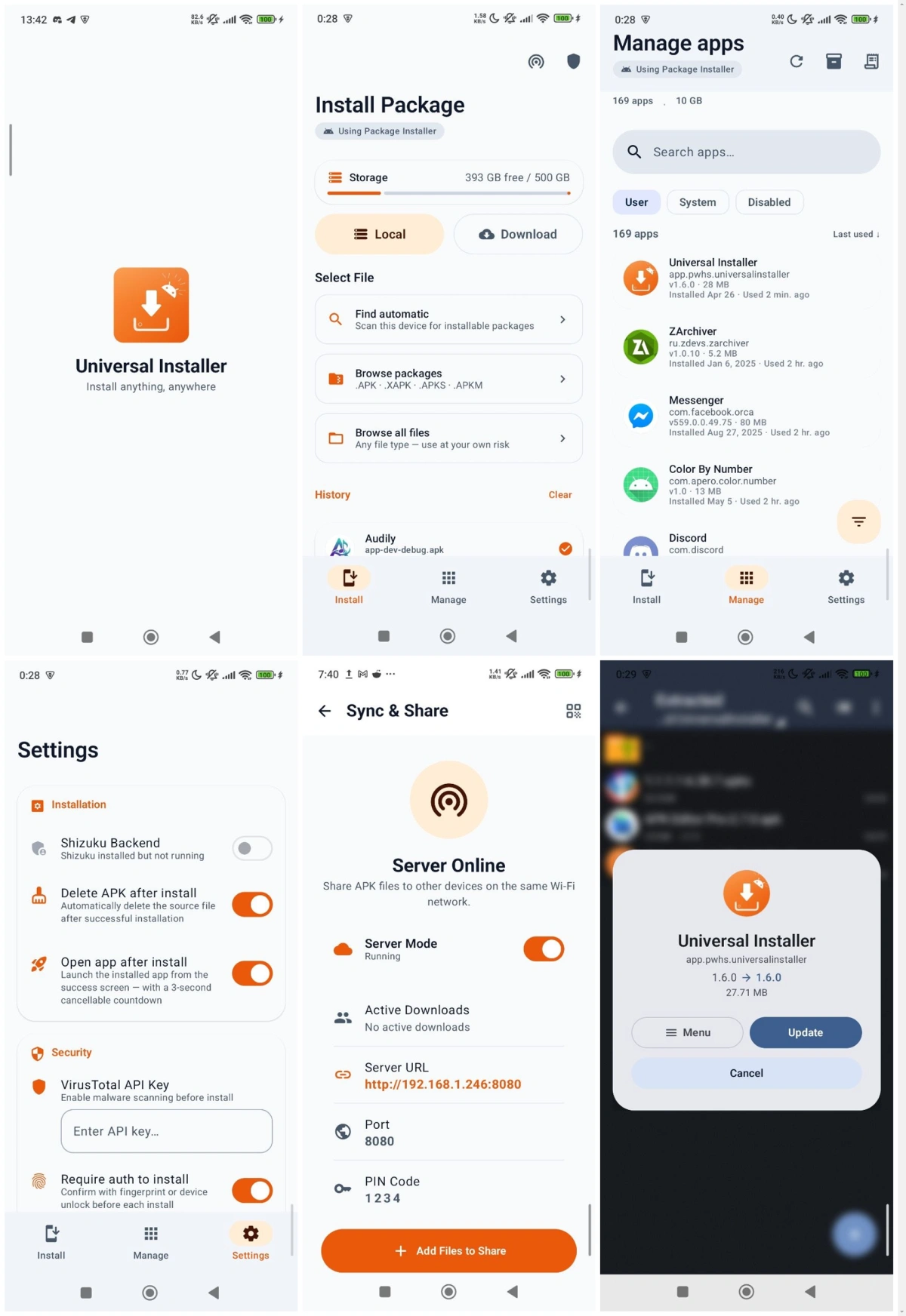
A Few Things I Like
Supports nearly all Android package formats. This is its core strength. Regular .apk goes without saying, but it also handles .apks (SAI format), .apkm (APKMirror format), .xapk (APKPure format), and even .apk+ flawlessly. In the past, encountering a split package meant hunting for a separate merging tool – now one app does it all.
Shows full package info before installation. Before you hit install, it displays a bottom sheet with everything you need to know: app name, icon, version, package name, size, minimum and target SDK, supported architectures, languages, permissions, number of OBB files, split count, and more. This thoughtful design lets you see exactly what permissions the app requests before you commit.
Automatic OBB handling. Many large games come with .obb data files alongside the APK, and manually copying them to Android/obb/ is a chore. Universal Installer detects and copies OBB files to the correct location automatically – and the copy process runs in a foreground service, so it continues even if you leave the app. For anyone who frequently installs large games, this saves a ton of hassle.
Integrated VirusTotal security scanning. Every time you select a package, it automatically calculates the SHA‑256 hash and checks it against VirusTotal. If VirusTotal doesn't have a record yet, you can upload the file for a full multi‑engine scan. For packages downloaded from unofficial sources, this feature provides welcome peace of mind.
Material 3 design with smooth animations. The interface follows Material 3 guidelines, with a default orange theme that looks refined and dynamic colour support that follows the system theme. The spring animations during installation are delightfully polished – the whole experience feels less like a utility and more like a carefully crafted modern app.
Things That Could Be Better
Currently, the Universal Installer interface is primarily in English. While it's not difficult to navigate, first‑time users who aren't comfortable with English might need a little time to get oriented. Also, it needs to be installed first – which raises the classic chicken‑and‑egg problem: how do you install this installer if you can't even install a regular APK? Thankfully, the developer provides multiple distribution channels – F‑Droid, GitHub Releases, and the official website.
Another point is the learning curve for Shizuku silent installation. Although the documentation is detailed, for average users, understanding what Shizuku is, how to activate it, and how to grant permissions still takes some effort.
Free Usage License
Universal Installer is completely free and open‑source on GitHub. No ads, no in‑app purchases, and no "Pro" version – all features are fully accessible from the get‑go, with no restrictions.
Supported Platforms / Languages
Universal Installer supports Android 14, 15, and 16, and is already being prepared for Android 17 compatibility. It also includes specific adaptations for Android TV. The interface is primarily in English at the moment, but the GitHub page indicates that multi‑language support – including Simplified Chinese – is already available. The official website is https://universal-installer.pwhs.app/.
Who Is It For
- Users who frequently download apps from third‑party platforms – where packages often come in formats like
.apks,.xapk, or.apkmthat the system installer doesn't recognise - Android tinkerers – those who flash custom ROMs, install modded apps, or test different APK versions
- Gamers who install large games – dealing with OBB files manually is a pain, and this tool handles it automatically
- Privacy‑conscious users – who want to review full permission lists and run VirusTotal scans before installing
- Android TV users – installing apps on a TV is even more cumbersome than on a phone, and this tool's TV‑optimised interface helps
Alternatives
If you'd like to explore other options, here are a few worth checking out: SAI (Split APKs Installer) – a long‑standing split‑installer that supports .apks format, though its interface feels a bit dated; InstallerX – another open‑source split installer with a comprehensive feature set; and APKMirror Installer – the official installer from APKMirror, mainly focused on .apkm packages.
Final Thoughts
Universal Installer is a tool that does one thing exceptionally well – installing Android applications. It supports virtually every common package format, shows you complete package details before installation, handles OBB files automatically, integrates VirusTotal scanning, and does all of this with a beautifully crafted interface. If you've ever been frustrated by the "system installer can't recognise this file" error, give Universal Installer a try.