LosslessCut – The Best Free Tool for Lossless Video Cutting
Introduction
My first encounter with LosslessCut came from a pretty simple reason: I didn't want to wait for Premiere to export videos anymore.
At the time, I was working on some footage that didn't need anything fancy – just trimming the beginning and end, cutting out the middle parts I didn't want, and stitching a few clips together. Every time I opened Premiere, waited for it to load the project, dragged in the clips, made the cuts, and then waited for it to re‑encode everything on export – the whole process took over ten minutes. Eventually I thought, since I'm only doing the most basic trimming and joining, is there a way to skip the re‑encoding step entirely?
That's when someone mentioned LosslessCut.
It takes a completely different approach from conventional editing software. Instead of "rendering" the video again, it works directly on the original file – modifying only the timeline, leaving the actual video and audio data untouched. What does that mean? A several‑gigabyte video can be exported in just a few seconds, with the exact same quality as the original.
Why I Recommend It
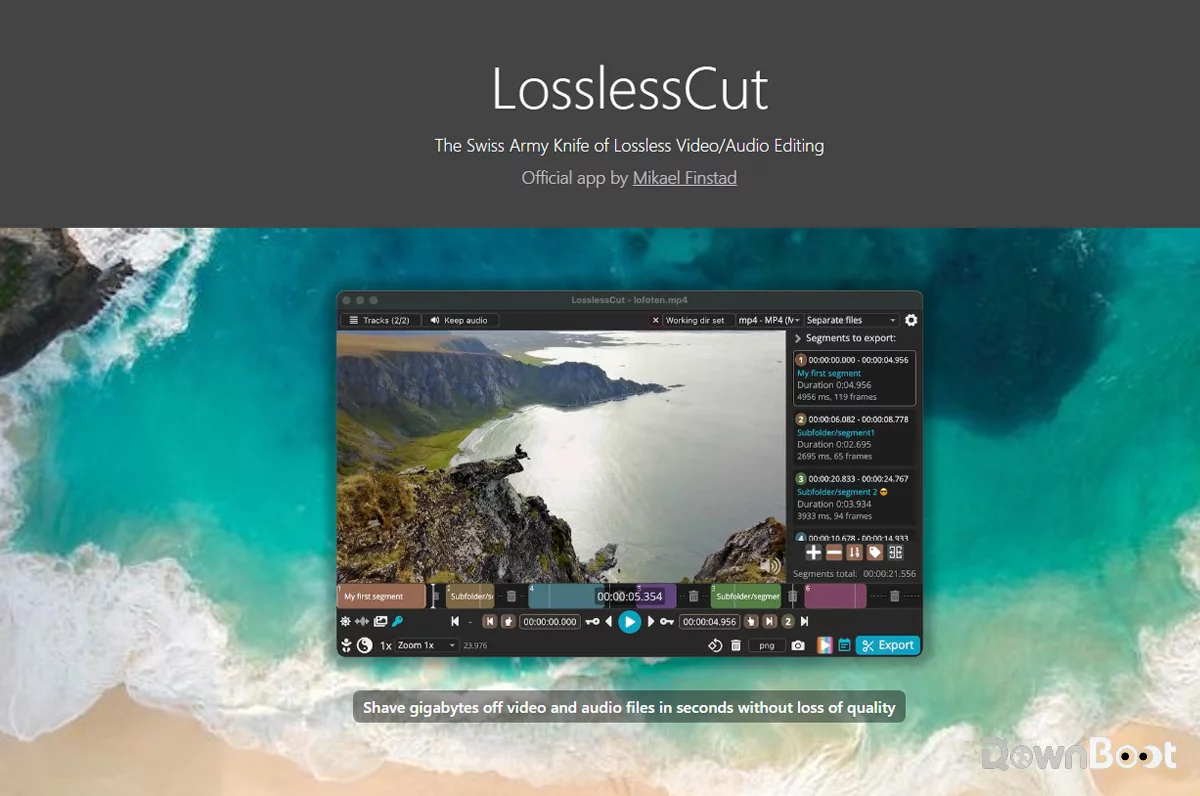
LosslessCut solves a very specific problem: when all you need is to trim, split, merge videos, or extract audio, you simply don't need those heavyweight professional tools. It takes the idea of "no re‑encoding" to its extreme.
Most video editing tools on the market, even for simple cuts, will re‑encode the entire video on export. This process is not only slow but also degrades quality. Under the hood, LosslessCut is powered by FFmpeg – it directly copies the video stream data instead of regenerating it. So the exported video retains the exact same quality, bitrate, and encoding format as the original.
Its use cases are actually quite broad: removing intros and outros from videos, cutting out ads, extracting highlight clips from long recordings, merging multiple videos with the same encoding, extracting audio tracks separately, and even pulling out subtitle files. All of these can be done in LosslessCut, and they all happen remarkably fast.
What's more, it's completely free and open‑source, released under the GPL‑2.0 license. No ads, no feature restrictions, no paywalls – free for personal use and commercial use alike. It has already accumulated over 16k stars on GitHub, which speaks to a pretty active community.
A Few Things I Like
The export speed is genuinely fast. This is the most noticeable difference. A 2.4GB 4K video, cutting out a 10‑minute section – the export took about 3 seconds. Traditional tools would take several minutes just for the re‑encoding. Processing a trimmed version of a 23‑minute 1080p video takes under a minute. Once you experience this speed difference, it's hard to go back.
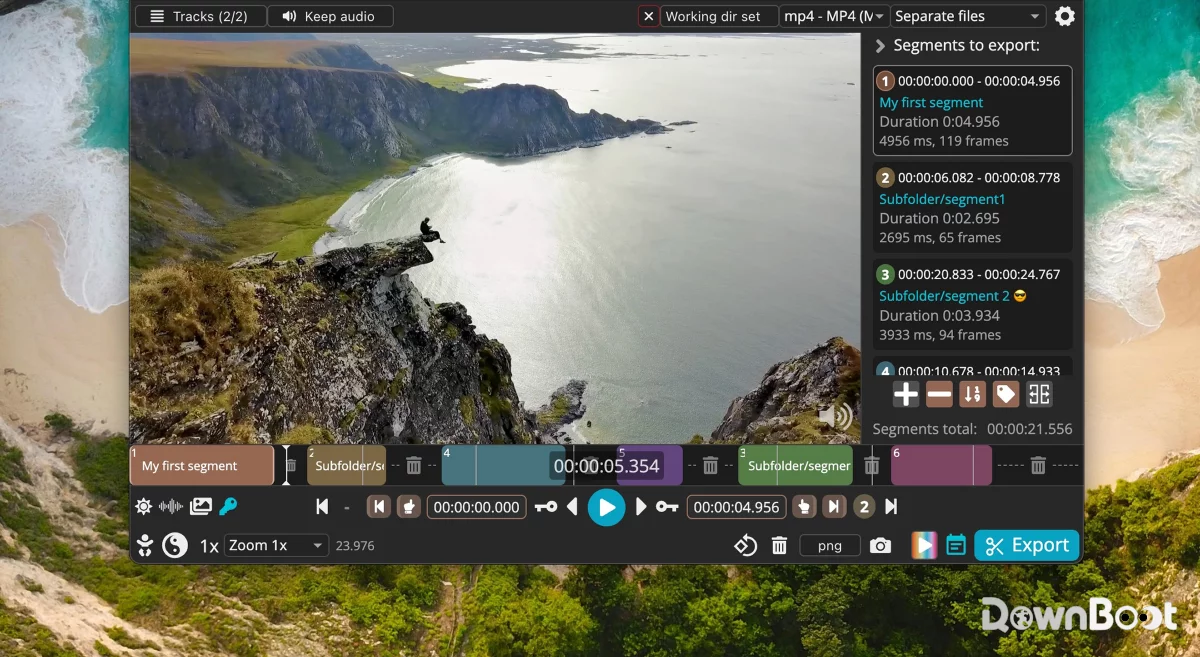
The operation logic is very straightforward. After opening a video, you mark "keep" and "remove" regions on the timeline. Once you're done marking, just hit export – that's it. The interface is divided into three parts: video preview, timeline, and function panel. No complicated menus, no hidden settings. Once you're familiar with it, the whole workflow takes about ten seconds.
Supports exporting multiple independent segments. This is a very practical feature. If you need to extract multiple sections from a long video, you can mark several keep regions on the timeline and choose either "export each segment separately" or "merge into one file". No need to open the same video repeatedly to cut it multiple times.
Extracting audio and subtitles is very convenient. Sometimes you only need the background music or voice track from a video, without the picture. LosslessCut can extract audio tracks directly, preserving the original quality. Subtitle extraction is also supported – subtitles embedded in MKV files can be separated out with ease.
Cross‑platform and lightweight. It has versions for Windows, macOS, and Linux. The installer is under 200MB, and the portable version can be downloaded and extracted without installation – just unzip and run. You can even put it on a USB drive and use it on any computer.
Some advanced features are tucked away. Although it's designed to be simple, LosslessCut actually hides quite a few useful features. For example, black frame detection, silence detection, and scene change detection – for those working with surveillance footage or long videos, these can help quickly locate the parts that need cutting. It also supports importing and exporting edit markers, which can be used alongside tools like DaVinci Resolve or Final Cut Pro.
What Could Be Better
LosslessCut isn't a Swiss Army knife – there are a few things it simply can't do.
No effects, transitions, or subtitle editing. It doesn't do colour grading, animations, transitions, or subtitle overlays. Its focus is strictly "lossless cutting", not "video creation". If you need to produce a complete video with effects and titles, you'll still need other tools.
The interface is quite basic. It's an Electron app, so the UI leans towards the utilitarian side – not exactly polished by modern desktop standards. If you have high expectations for visual design, it might look a bit rough on first impression.
Precise cuts at non‑keyframes may require re‑encoding. Because it works at the keyframe level, if the cut point falls outside a keyframe, the software may need to re‑encode those few frames. In most cases this isn't a big deal, but if you require frame‑perfect accuracy, it's something to keep in mind.
Some users find the operation takes some getting used to. A few first‑time users mention that the marking logic feels different from what they're used to in typical editing software. For me, it took a few minutes to get the hang of it and after that it was smooth sailing – but it's not quite a "zero‑learning‑curve" tool.
Free Usage License
LosslessCut is completely free, released under the GPL‑2.0 open‑source license. It's free for both personal and commercial use, with no feature restrictions, ads, or paywalls. The source code is fully open and hosted on GitHub – anyone can view it, modify it, or contribute.
Supported Platforms / Languages
LosslessCut supports Windows, macOS, and Linux. For Windows, both an installer and a portable version (7z archive) are available; macOS provides a dmg package; Linux offers AppImage format. The interface supports multiple languages, including Simplified Chinese, which can be switched in the settings.
Who Is It For
- YouTube creators – quickly remove intros/outros, cut short clips
- Content creators and social media managers – process footage quickly, shorten editing turnaround
- Photographers / videographers – organise raw footage, remove unusable takes
- Surveillance footage processing – quickly trim and export specific time windows
- Everyday users – cut out ads, intros, or outros from videos with simple operations
- Podcasters – extract audio tracks or separate multi‑track audio
Alternatives
If you're interested in lossless video processing tools, these are also worth checking out: Avidemux – a long‑standing free video editing tool that also supports lossless cutting, though with a more traditional interface; Shotcut – a more fully‑featured open‑source video editor with lossless mode support, but with a steeper learning curve; LosslessCut remains the most focused and fastest for "pure lossless cutting".
Final Thoughts
LosslessCut isn't a full‑featured video editor – it doesn't do effects, colour grading, or subtitles. It does one thing: cut your video into the shape you want, as fast as possible, without any loss in quality.
If you frequently need to trim videos, split footage, extract audio, or merge clips, it will save you a huge amount of time waiting for exports. A several‑gigabyte video can be processed in seconds – once you've experienced that kind of efficiency, it's hard to go back.