Salt Player – A Beautiful Offline Music Player for Android
Introduction
Have you noticed that it is becoming increasingly difficult to find a pure local music player these days? Most music apps in the app stores focus on online music, recommended playlists, live streaming, podcasts, and other content. When you open the home page, you are flooded with various recommendations, while the features that truly belong to the player itself are越来越少. A while ago, when I was organizing the music on my computer, I synced my collection of FLAC and MP3 files that I had kept for many years to my phone. I thought I would just find a player to use, but after trying a few, either there were too many ads, the interface was too complicated, or some even started recommending various online content. Later, I stumbled upon a recommendation for Salt Player, and I decided to give it a try. After using it for a few days, I found it to be quite good.
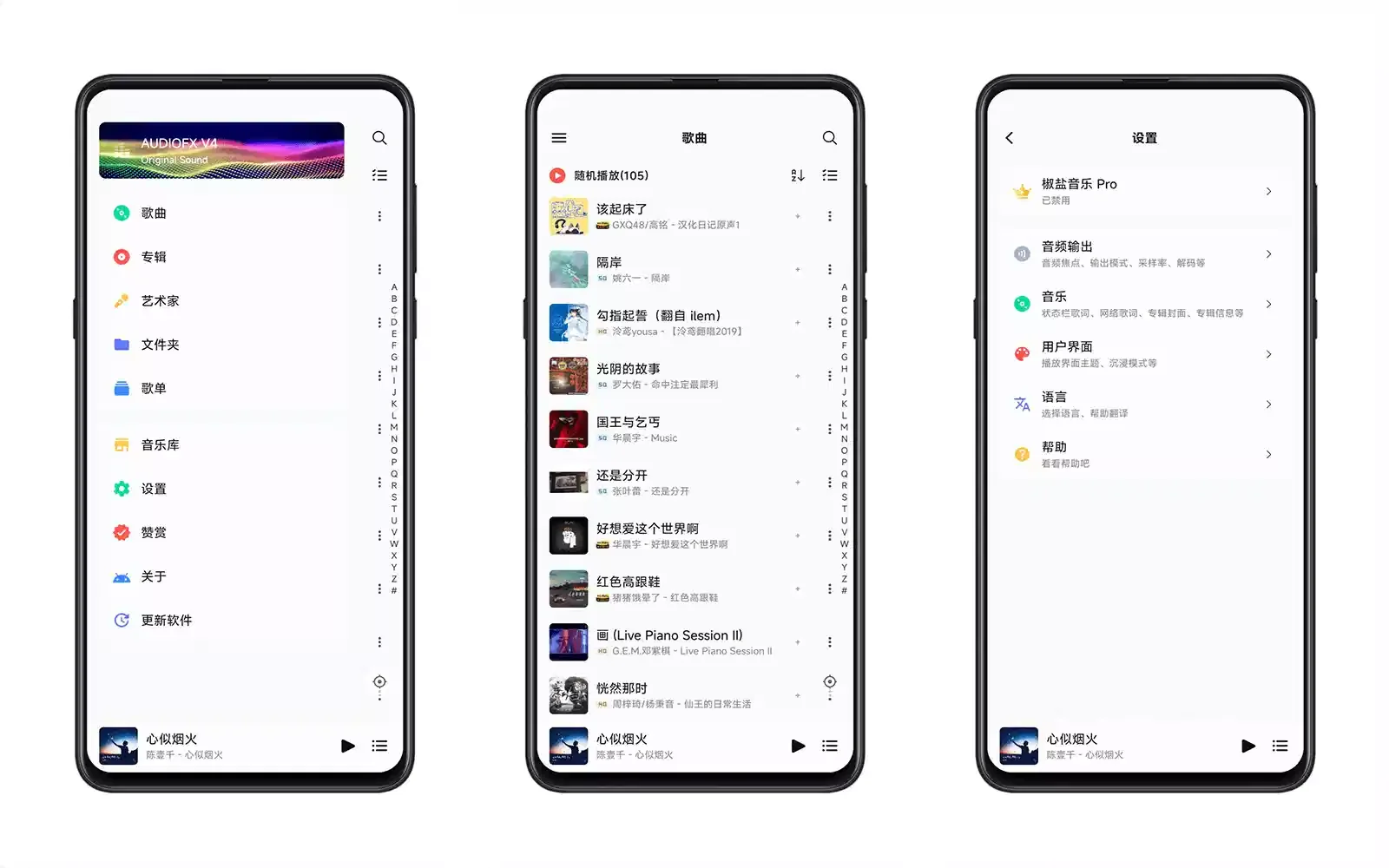
It feels more like a player that takes its craft seriously
The first time I opened Salt Player, my first impression was cleanliness. There were no recommendation pages, no membership prompts, and no "suggested for you" content. After scanning the local music, the home page displayed the most commonly used sections: songs, albums, artists, folders, and playlists. It looked very comfortable. Many players today want to keep users within their own ecosystem, but Salt Player seems to focus on doing the player aspect well. For those who mainly listen to local music, this design aligns much better with their habits.
Comprehensive support for local music
I imported an entire music folder containing all sorts of formats: MP3, FLAC, AAC, and a few APE files I had collected long ago. The player recognized almost all of them properly. Album covers, artist information, and track tags were all read correctly, with no garbled characters or misclassification. The official support currently includes many mainstream audio formats such as MP3, FLAC, APE, AAC, WAV, OGG, M4A, OPUS, and more. If you have a rich music library, this is quite reassuring.
Lyrics experience is more refined than expected
I used to think that as long as lyrics could be displayed, it was enough. But after using Salt Player, I realized that it has put considerable effort into lyrics features. In addition to supporting embedded lyrics and LRC files, it also supports desktop lyrics and status bar lyrics, with adjustable styles. When listening with headphones, the lyrics viewing experience is indeed pleasant. If you enjoy singing along with the lyrics, you will likely appreciate this.
Many details that become noticeable only after prolonged use
After using it for a few days, I noticed that the developer did not simply pile on features but paid attention to many details. For example, you can specify which folders to scan, and add unwanted directories to a blacklist to avoid scanning things like WeChat voice messages or cache files. Playlists, album covers, dark mode, and other features are also well implemented, making the overall operation smooth. One small feature I particularly like is the listening statistics. Although not essential, it is interesting to occasionally check which songs or artists I have been listening to most recently.
Good Android adaptation
This is another aspect that surprised me. Salt Player has made many adaptations for the Android system, including status bar lyrics, media controls, and notification bar playback controls, providing a consistent experience across different phone brands. If your phone supports the relevant system capabilities, you can enjoy an even more complete playback experience. Compared to some players that have not been updated for years, it clearly fits better with the current Android design language.
Free, but not fully free; open source, but not fully open source
This is a point that many people tend to confuse. Salt Player can be downloaded for free and has no ads, and daily use is essentially unrestricted. Salt Player Pro and the Windows version are paid: Salt Player Pro costs 25 RMB, and the Windows version costs $9.99 USD. Salt Player is open source, but it is not fully open source software. The developer has made public some basic components, development documentation, and related projects to facilitate community participation and learning, but the main player itself is not fully open source. If you are concerned about software licensing, it is better to be aware of this in advance.
Supported platforms
Currently, Salt Player offers versions for multiple platforms, including: Android, Windows (under active development). The official website and GitHub provide several download channels, and updates are fairly regular.
Supported languages
Currently mainly supports: Simplified Chinese, English (partial versions). With future updates, more language support may be added.
Who is it suitable for?
I think the following types of users would find Salt Player suitable: Those who have a large collection of local music on their phones. Those who enjoy collecting lossless audio like FLAC and APE. Those who do not want to be bothered by various recommendations and just want to listen to music quietly. Those who want a clean interface without ads. Those who like to organize their music library and care about albums, lyrics, and tags. If you almost always use Spotify, Apple Music, or NetEase Cloud Music, Salt Player may not appeal to you as much. But if you keep a lot of local songs on your phone, I would still recommend giving it a try.
Free usage notes
Salt Player can be downloaded and used for free, with official download channels including the official website and GitHub. The software has no forced ads and no functional restrictions that affect normal use. The developer continuously updates and improves the player experience. It is important to note that while the software is distributed for free, the core is not fully open source. If you plan to participate in development or make secondary modifications, please first review the official project description and license information.
Final words
In recent years, local music players seem to have become increasingly niche. More and more people are accustomed to opening streaming services, searching for a song, and then exiting after listening. The number of people who genuinely take the time to organize their music libraries and collect albums appears to be dwindling. It is precisely for this reason that software like Salt Player stands out. It does not try to be a music platform, nor does it cram the home page with various recommendations. Instead, it returns the focus to the player itself. For those who love local music, this kind of dedication is a rare and valuable experience.
If you prefer a feature-rich player, you might check out AIMP; if you value Material Design aesthetics, Metro Music Player is also a good alternative.