dupeGuru – Free Open-Source Duplicate File Finder
Introduction
Recently, while organising my photo album, I ran into a frustrating problem – not that I had too many photos, but that I had too many duplicates. Some came from phone syncs, some were saved twice from WeChat, and others were cropped or compressed versions sent back and forth. Going through them manually was next to impossible. I tried a few duplicate file cleaners, but many of them were powerful yet overly complicated. Then I came across dupeGuru, and my first thought was – finally, a tool that works right out of the box without a long learning curve.
Why Recommend It
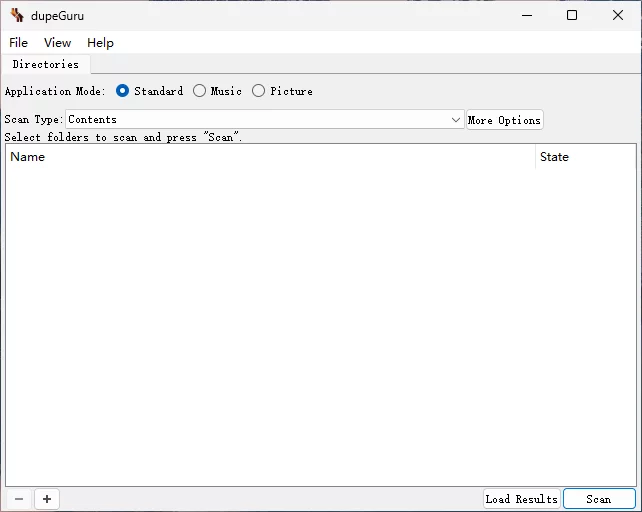
When you open dupeGuru, you see only three modes: Standard, Picture, and Music. No dozens of buttons, no confusion about where to start – even first‑time users won't feel lost. It doesn't bombard you with scanning options; instead, it asks you to choose your scenario – general files, images, or music – then add folders and hit scan. That's it. Many tools suffer from too many features and deep menus, but dupeGuru does the opposite – it hides complexity behind the scenes and puts simplicity front and centre.
A Few Things I Like
Similar image detection. The Picture mode in dupeGuru doesn't rely on filenames – it analyses image content. Scaled, cropped, or compressed versions of the same photo can still be recognised. This is incredibly useful when organising your photo library – those images that have been compressed by messaging apps or cropped by screenshot tools can all be found without manual comparison.
Music mode. Many people don't know that dupeGuru can also find duplicate music. Its Music mode scans tags as well as content to determine duplicates. If you have a collection of FLAC or high‑bitrate audio, this feature helps you clean up duplicate files and free up significant space.
Consistent cross‑platform experience. Versions are available for Windows, macOS, and Linux, with almost identical interfaces. If you switch between different operating systems, you won't need to relearn anything – just open and go, which is a real comfort.
Free and open‑source. dupeGuru is released under GPL v3. No ads, no subscriptions, no Pro version, no login required. Just download and use it without any hidden costs. Its matching engine is also designed with safety in mind – reference directories and grouping systems help prevent accidental deletions.
What I Feel Could Be Better
Compared to AllDup, dupeGuru doesn't offer as many advanced filtering options or highly complex search rules. If you enjoy tinkering with various scan conditions and combining hash values and timestamps freely, you might find dupeGuru a bit limited. But that trade‑off brings simplicity – you can start using it immediately without spending half an hour studying it. Its strength is not in being the most feature‑rich, but in being the easiest to pick up.
Free Usage License
dupeGuru is completely free and open‑source under the GPL v3 license, with source code hosted on GitHub. It supports Windows, macOS, and Linux – no ads, no feature restrictions, and no registration required. All features are fully accessible after download and installation.
Supported Platforms / Languages
dupeGuru runs on Windows, macOS, and Linux. For interface languages, it currently supports English, French, German, Simplified Chinese, Czech, Italian, Armenian, Russian, Ukrainian, Brazilian Portuguese, Vietnamese, and more. The inclusion of Simplified Chinese is a nice bonus for users in China.
Who Is It For
- Users organising phone photos – clean up duplicates created by syncs, backups, and forwards using Picture mode
- Home computer users – want a straightforward way to find and delete duplicate files without complex setups
- Music collectors – identify duplicate FLAC or MP3 files with tag‑ and content‑based matching in Music mode
- Laptop users – limited storage makes eliminating duplicates especially valuable
- Mac and Linux users – many similar tools are Windows‑only; dupeGuru is one of the few that covers all three platforms
dupeGuru vs Czkawka – How to Choose
Many people hesitate between these two, but their focus areas are quite different. Here's a quick comparison:
| Comparison | dupeGuru | Czkawka |
|---|---|---|
| Open Source | ✅ (GPL v3) | ✅ (MIT) |
| Windows | ✅ | ✅ |
| macOS | ✅ | ✅ |
| Linux | ✅ | ✅ |
| Similar Images | ✅ | ✅ |
| Similar Music | ✅ | ✅ |
| Large File Analysis | ❌ | ✅ |
| Empty Folder Cleaner | ❌ | ✅ |
| Broken File Detection | ❌ | ✅ |
| Feature Complexity | ⭐ (simple) | ⭐⭐⭐⭐ (comprehensive) |
| Ease of Use | ⭐ (very easy) | ⭐⭐⭐ (moderate) |
If you just want to clean up duplicate photos and music, I think dupeGuru is more than enough – open, choose a mode, add folders, scan, and you're done in minutes. If you also want to tackle large files, empty directories, broken files, and more, Czkawka offers broader coverage. They don't conflict; you could even use them together.
Alternatives
If you're still exploring, here are some options based on your needs: AllDup – the most feature‑rich duplicate finder for Windows, with highly customisable search rules, ideal for power users; Czkawka – open‑source and cross‑platform, goes beyond deduplication to clean large files, empty folders, broken files, and more, suitable for thorough disk cleanup; CloneSpy – a long‑standing Windows duplicate finder with comprehensive functionality; and Everything – not a dedicated deduplicator, but its fast filename search can help you quickly locate potential duplicates.
Final Thoughts
dupeGuru is a tool with a clear purpose – it's not about having the most features, but about being the easiest to use. Its three modes cover the most common everyday scenarios, cross‑platform support lets it run on Windows, Mac, and Linux, and it's completely free with no ads. If you simply want to clear out duplicate photos and music without diving into complex settings, dupeGuru is the most hassle‑free option I've used.