Czkawka – Free Duplicate File Finder & Disk Cleanup Tool
Introduction
Recently, while organising my NAS, I realised my hard drive was running out of space. At first I thought it was because I had downloaded too many movies, but after a closer look I found that the same set of photos was backed up in three places – one copy synced from my phone, one from OneDrive, and another on the NAS. There were also several gigabytes of installation packages that I had forgotten to delete. The real space hogs weren't new files, but rather those "things left behind from who knows when". Then someone recommended Czkawka. I just wanted to find duplicate photos at first, but the more I used it, the more it felt like a full‑system hard drive health check tool.
Why Recommend It
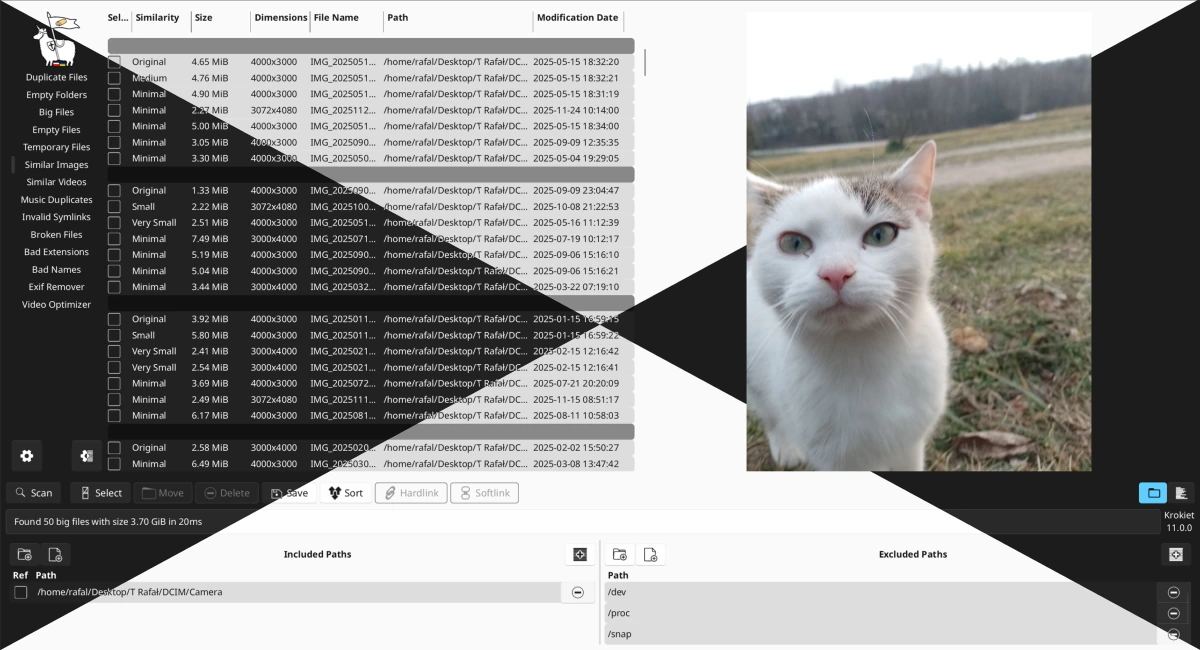
Most similar tools on the market do only one thing – find duplicate files. But Czkawka is a completely different beast – it's an all‑in‑one disk cleaning tool. In addition to the usual duplicate file search, it can also find similar images, similar videos, empty folders, empty files, large files, temporary files, broken files, invalid shortcuts, and even detect files whose extensions don't match their content, or remove EXIF metadata. Each of these features alone isn't earth‑shattering, but having them all integrated into one free, open‑source application makes it incredibly handy to use.
Another thing is its speed. Czkawka is written in Rust, and the developers have always emphasised "Amazingly Fast" and memory efficiency. I haven't done any formal benchmarking, but scanning a few tens of gigabytes of directories was noticeably quicker than I expected, and subsequent scans are even faster thanks to caching.
A Few Things I Like
Similar image search. It doesn't just look at filenames; it looks at content. Burst‑shot photos, compressed versions, and resized copies of the same image can all be identified. This is extremely useful for photography enthusiasts – every time you import photos, you end up with various versions (RAW, JPG, thumbnails) mixed together, and this feature helps you quickly locate what's genuinely duplicated.
Large file analysis. Often, it's not photos that take up the most space, but ISO images, installer packages, screen recordings, and cache files that can be dozens of gigabytes. Czkawka sorts files by size, letting you spot at a glance which files are "stealing" your space.
Empty folder cleaner. This is a simple feature, but extremely useful. Various sync tools, extraction utilities, and installers tend to leave behind a lot of empty directories that you'd never notice under normal circumstances – Czkawka finds them all in one sweep.
Broken file detection. Sometimes you only realise a file is corrupted when you try to open it. Czkawka proactively scans and lists damaged or invalid files. Catching them early is always better than discovering the problem halfway through a task.
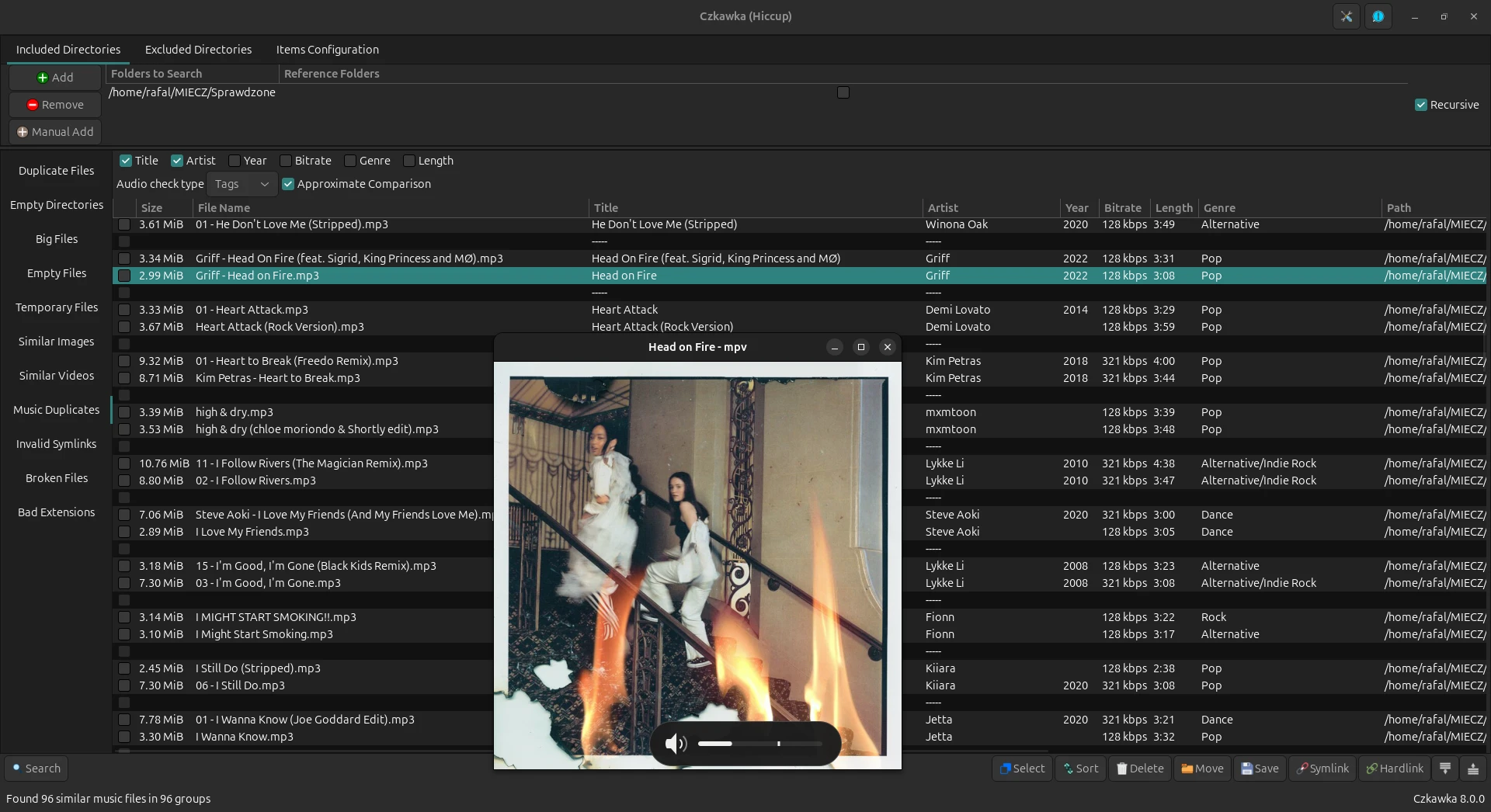
Duplicate music search. It supports deduplication by either tags or content. If you like to collect FLAC or high‑bitrate music, this feature helps you clean up duplicate audio files efficiently.
Another point worth mentioning is that Czkawka never deletes anything automatically. All results are displayed after a scan for you to review individually. I always take a moment to check everything and only proceed when I'm certain – especially with photos, it's better to be safe than sorry.
Free Usage License
Czkawka is completely free and open‑source, released under the MIT License. There are no ads, no subscription plans, and no feature limitations. You don't even need to register – just download, extract, and run. What's more, it has no network access permissions, so it collects no user information or usage statistics – which is a big plus for privacy‑conscious users.
Supported Platforms / Languages
Czkawka supports Windows, Linux, macOS, FreeBSD, and even has an Android version. It covers architectures including x86, ARM, and RISC‑V, so it runs on most mainstream devices. The interface is available in multiple languages, including Simplified Chinese. A portable version is also provided – no installation required, just run it directly.
Who Is It For
- NAS users – repeated backups from multiple devices lead to duplicated files that need regular cleaning
- Photography enthusiasts – RAW, JPG, and thumbnails all mixed together; similar image search is a lifesaver
- Video editors – constant copying of footage leaves duplicate clips scattered across project folders
- People who frequently back up their phones – each backup creates a full copy, and old backups are hard to let go
- Download hoarders – forgetting to organise after downloads leads to multiple versions of the same movie
- Users who want to clean up their SSD – SSD space is precious; you need to remove large files and unnecessary duplicates
Czkawka vs AllDup – How to Choose
Many people compare Czkawka and AllDup, but their focuses are actually quite different. Here's a quick breakdown:
| Comparison | Czkawka | AllDup |
|---|---|---|
| Open Source | ✅ (MIT License) | ❌ |
| Windows | ✅ | ✅ |
| Linux | ✅ | ❌ |
| macOS | ✅ | ❌ |
| Similar Images | ✅ | ✅ |
| Similar Videos | ✅ | ❌ |
| Large File Analysis | ✅ (prominent) | ❌ (not emphasised) |
| Empty Folders | ✅ | Partial |
| Broken Files | ✅ | ❌ |
| Temporary Files | ✅ | ❌ |
| Portable Version | ✅ | ✅ |
To summarise: if you're a Windows‑only user and need very detailed deduplication rules (e.g., flexible combinations of content, size, modification time, and hash), I'd go with AllDup. But if you want one tool that can handle duplicate files, large files, empty folders, broken files, and more, while also being cross‑platform, then Czkawka is the more comprehensive choice.
Alternatives
If you'd like to explore other options, here are a few worth checking out: AllDup – one of the most feature‑rich duplicate file finders for Windows, with highly customisable search rules; dupeGuru – open‑source and free, cross‑platform, supports image and music similarity search; CloneSpy – a long‑standing Windows duplicate finder with comprehensive features; Everything – though not a dedicated deduplication tool, it can help quickly locate potential duplicates by filename search; and WizTree – a specialised disk space analyser that rapidly shows you which folders and files are taking up the most space.
Final Thoughts
Czkawka is a tool that does disk cleaning thoroughly and comprehensively. It's not flashy, but it covers a wide range of areas, is fast, completely free and open‑source, and works across multiple platforms. If you're also struggling with duplicate files, empty folders, and large files cluttering your hard drive, give Czkawka a try. Start by scanning your Downloads or Pictures folder to get familiar with it, and only then expand to the whole drive – and please, don't scan your entire system drive on the first run.