AllDup – Free Duplicate File Finder for Windows
Introduction
Recently, while organising my external hard drive, I realised how messy my photo backups had become over the years. The same photo saved in three places, the same movie downloaded in two versions, images from WeChat, NAS backups, USB syncs… before I knew it, hard drive space was shrinking fast. I thought about manually deleting duplicates, but gave up after scrolling through folders for ten minutes. Then I tried AllDup.
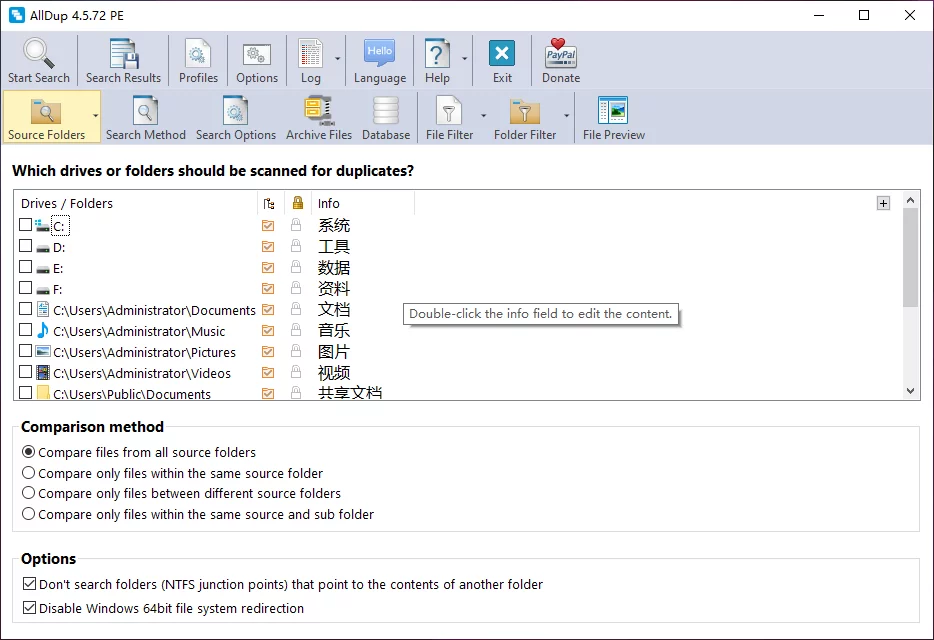
Why Recommend It
There are plenty of tools that can find duplicate files, but what sets AllDup apart is that it genuinely finds duplicates by content, not by filename. Many so‑called "duplicate finders" simply check whether filenames match. But does the same filename mean the same file? Obviously not. The same photo could be named IMG_001.jpg or 20240101_001.jpg – completely different filenames, yet identical content. AllDup lets you search by file content, file size, modification time, file attributes, and hash values, and even supports similarity matching for images and music. You can combine these criteria freely, giving you full control over search precision.
Another thing that surprised me is its coverage. Many duplicate finders only handle images, but AllDup scans images, videos, documents, PDFs, ZIPs, RARs, MP3s, and even files inside compressed archives. Few tools offer this capability. For example, if you've downloaded several versions of a software package, they may contain the same files inside – AllDup can identify them directly, saving you the hassle of extracting and comparing each one.
The deletion options also inspire confidence. AllDup doesn't push you to "delete everything in one click" – it offers multiple ways to handle duplicates: Recycle Bin, move, backup, create Hard Links, or create shortcuts. The official documentation consistently emphasises: preview first, act later. After a scan, all duplicates are listed clearly, and you can review each file's path, size, and modification date before deciding what to do.
As for scanning speed, the official site highlights its Fast Search Algorithm, and in practice it lives up to that claim. A few hundred gigabytes on an external drive typically yields results in just a few minutes.
A Few Things I Like
Very granular search filters. You can scan only images, only videos, specify size ranges, target particular folders, or exclude system directories. No need to scan the entire drive every time – just scan what you need.
No automatic deletion after scanning. Every result comes with a preview, showing the exact location and size of each duplicate. This gives me peace of mind, especially when dealing with photos – a mistaken deletion could cost years of memories.
Portable version available. No installation required – just unzip and run. You can keep it on a USB drive and use it on any computer without leaving traces.
Free Usage License
This deserves special mention – because many tools offer "free scanning, pay to delete", but AllDup is genuinely free. It is free for both personal and commercial use. No registration, no activation code – just download and start using it. Both installer and portable versions are available from the official website.
Supported Platforms / Languages
AllDup works on Windows 11, 10, 8, 7, and Windows Server 2008 R2 through 2025, with both 32‑bit and 64‑bit editions supported. The interface is available in over 20 languages, including Simplified Chinese.
Who Is It For
- Users with too many photos – images from phones, cameras, and WeChat all mixed up, with many duplicates
- NAS users – multiple devices backing up to NAS, leading to a pile‑up of duplicate files over time
- Photography enthusiasts – each import creates another backup, and the same RAW file may end up in three or four folders
- People who frequently back up their phones – each backup generates a complete copy, and old backups are hard to part with
- Download hoarders – forgetting to organise after downloading, ending up with multiple versions of the same movie
- Video editors – constant copying of footage, resulting in duplicate clips scattered across project folders
Alternatives
If you'd like to explore other options, here are a few worth knowing: dupeGuru – open‑source and free, cross‑platform (Windows, macOS, Linux), supports similarity search for images and music; Czkawka – open‑source and free, written in Rust, very fast with a clean interface; Everything – not a dedicated duplicate finder, but combined with filename searches it can quickly help locate suspected duplicates; CloneSpy – a long‑standing Windows duplicate finder with comprehensive features.
Final Thoughts
AllDup is a tool that does one thing well – finding duplicates – and does it thoroughly. It's not flashy, but its flexible search options, broad file‑type support, safe handling of results, and free use for both individuals and businesses make it a solid choice. If you're struggling with a messy hard drive full of duplicate files, start small – try scanning your Downloads or Pictures folder first, and only broaden the scope after you're comfortable with the results. And whatever you do, don't scan your C: drive on the first go.