Mp3tag – Free Music Tag Editor for MP3, FLAC & More
Introduction
I used to think that as long as music could play, that was enough. But as I collected more and more lossless music, I realised that the real hassle wasn’t downloading—it was organising. Some albums had no cover art, artist names were a mess, and the same album would even show up as two or three separate entries in my player. Then I started using Mp3tag, and most of these problems were sorted out in one go.
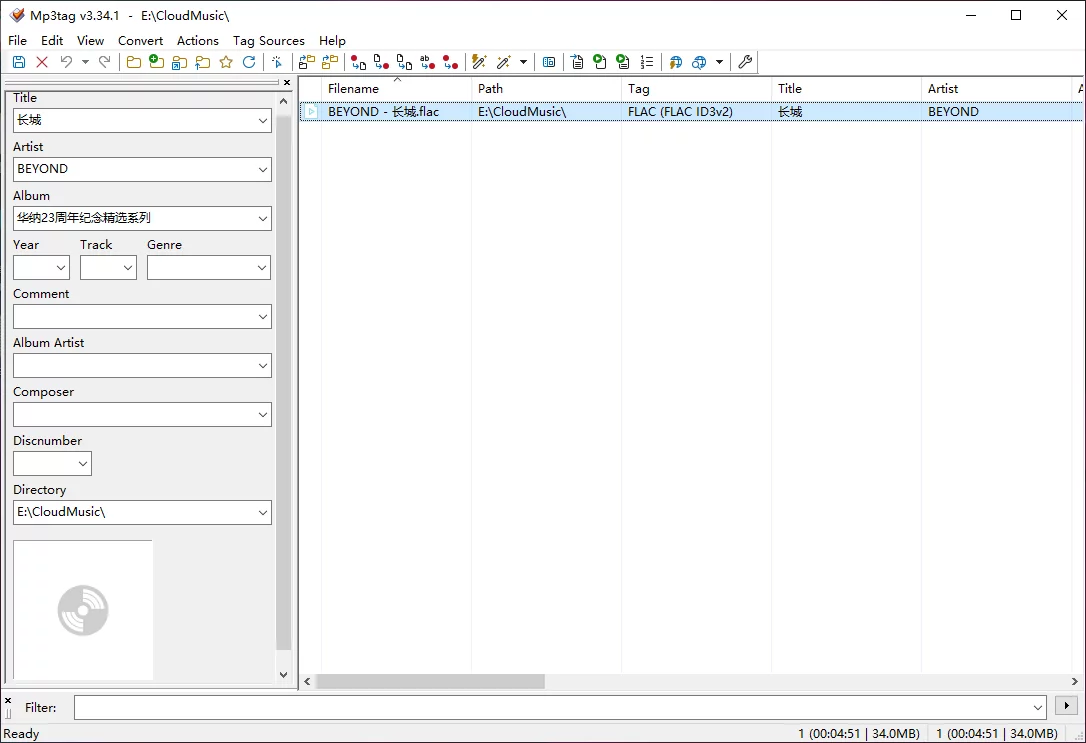
Why Recommend It
Mp3tag addresses the core pain point of local music library management—metadata chaos. Music files downloaded from the web often lack proper tag information: incomplete artist names, mismatched album titles, missing covers, or even the same artist appearing under different spellings across folders. What Mp3tag does is straightforward: batch tag editing, automatic cover downloading, metadata retrieval from online databases, renaming files based on tags, and rebuilding your music library. These are exactly the most time‑consuming and necessary tasks when organising a music collection. What's more, it has been actively maintained since its release around 2000—over two decades of continuous updates. For a tool of this age, stability is unquestionable.
A Few Things I Like
Batch editing that handles everything at once. Mp3tag's greatest strength is batch operations. Select dozens or even hundreds of tracks, and you can modify artist, album, genre, and other tag fields in a single go. For instance, changing all songs in a folder to the same album name takes just seconds—no need to edit each file manually.
Automatic information retrieval from online databases. This is my most frequently used feature. Mp3tag can pull album details and covers from online music databases like Discogs, MusicBrainz, and freedb. Select a folder of songs, click the lookup button, and the software automatically matches the correct album, filling in artist, album name, track numbers, and cover art—saving you from tedious manual searching and copy‑pasting.
Cover management is a breeze. Beyond automatic downloads, you can manually add, replace, or export covers. This is especially useful for albums with missing or messy artwork. Once organised, your music library looks neat and tidy in any player—a truly satisfying sight.
Two‑way conversion between tags and filenames. This is a clever feature. You can rename files automatically from tag information (e.g., “Artist - Album - Track No. Title.mp3”), or parse tag data from filenames. Whatever your naming habit, there's a way to keep things consistent.
Regular expression support—a power‑user's dream. For those with a coding background, Mp3tag supports regular expressions for replacing characters and words. This enables batch processing of even the most complex tag‑formatting issues with incredible flexibility.
Free Usage License
Mp3tag's licensing differs by platform: the Windows version is free to download and use, developed and maintained by German developer Florian Heidenreich. The official website also offers a donation option if you find it useful and wish to support the developer's work. The macOS version, on the other hand, is a paid application available through the Mac App Store. The developer spent over two years building a native Mac version, which delivers an experience consistent with the Windows edition.
Supported Platforms / Languages
Mp3tag supports Windows (both 64‑bit and 32‑bit, compatible with Windows 7 through Windows 11) and macOS. The interface is available in more than 20 languages, including Chinese, which can be switched in the settings. Full Unicode support means you'll rarely encounter garbled text when handling multilingual tags.
Who Is It For
- Music enthusiasts—who have large local collections and want to keep them impeccably organised
- Podcasters / music producers—who need to properly embed metadata before releasing their work
- Digital collectors—who manage massive numbers of audio files and need batch tagging and cover management
- Regular users who download from cloud drives or forums—where files often come with messy tags that need cleaning up
Alternatives
If you'd like to explore other options, here are a few worth knowing: MusicBrainz Picard—open‑source, cross‑platform, focused on automatic identification and tag matching, backed by the MusicBrainz database with high accuracy; Kid3—open‑source, cross‑platform, supports batch editing and online database queries with a relatively simple interface; Meta—a paid tag editor for macOS with a modern, intuitive interface; and EasyTAG—open‑source, mainly for Linux users, offering a comprehensive set of features.
Final Thoughts
Mp3tag is a tool that stays true to its purpose—it doesn't try to be flashy, but it excels at tag editing like no other. With over two decades of refinement, it has become incredibly mature and reliable in batch processing, database lookups, and format compatibility. If you're struggling with a messy local music library, give Mp3tag a try. Windows users can download it for free, and macOS users can consider paying for a well‑crafted piece of software. Official download page: https://www.mp3tag.de/