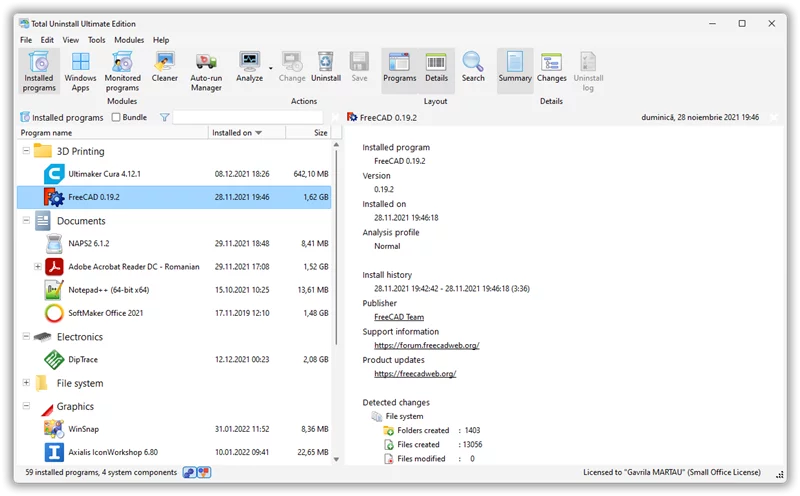
Uninstall Tool is a compact, safe, fast, and powerful software uninstaller. After a program's own uninstaller finishes, this tool scans for leftover registry entries and files to wipe them from your system completely! It features an "Installation Monitor" that watches every file and registry change in real-time as you install a new app. This ensures that when you decide to remove it later, Uninstall Tool can erase every single trace perfectly. The software also includes a startup manager to help speed up your computer's boot time. Overall, Uninstall Tool offers the powerful features of "Total Uninstall" with a much smaller file size and a more user-friendly interface, making it an excellent choice for keeping your PC clean.
When you run it for the first time, it will suggest creating a "Pre-install Snapshot." This takes about 30 seconds to take a "photo" of your registry, system folders, services, and scheduled tasks.
Monitor Installations
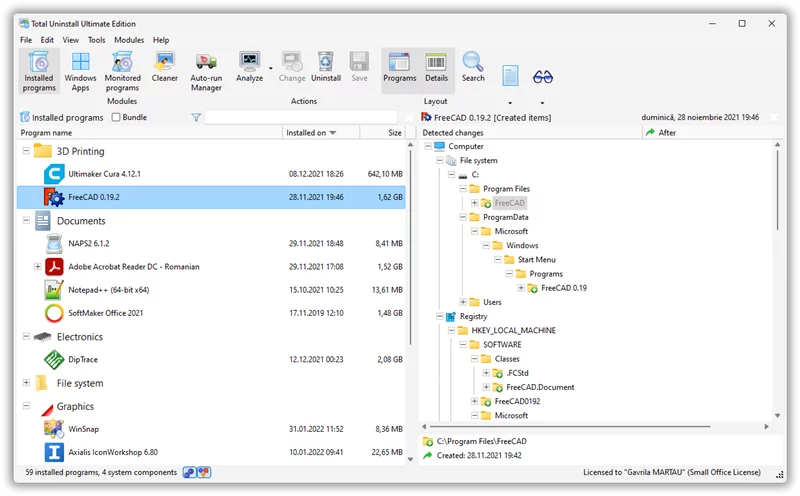
When you install new software, the tool works in the background to compare changes. It creates a "Post-install Snapshot" and automatically lists everything that was added, changed, or deleted. You can even export an HTML log to see exactly what "junk" was added to your system.
Clean Uninstallation
Using the "Analyzed Programs" module, just select a piece of software and click "Complete Uninstall." The tool follows the snapshot in reverse: it deletes registry keys first, then system files, and finally the installation folder. It can even force-remove stubborn files that regular uninstallers leave behind.
Batch Rollback
You can select multiple programs at once to uninstall them in a queue. It also creates restore points, so if you delete something by mistake, you can get it back, keeping your system stable.
Extra Features
It also handles startup item management, service cleaning, and junk file scanning. It can even monitor Windows Updates and driver installations, ensuring that "whatever gets installed can be undone."