
WildBit Viewer is an image viewing and editing tool that supports all major file formats. It is actually a suite of several independent programs: it includes a slideshow creator with smooth transition effects, and a basic image editor for quick fixes and color corrections. It also allows you to manage different profiles and supports multi-monitor setups, making it easy to switch your view between two screens.
WildBit Viewer features an advanced search tool that lets you find images by date, size, name, or other details. You can also sort your photos using various settings, tag them, or add them to a "favorites" list for quick access.
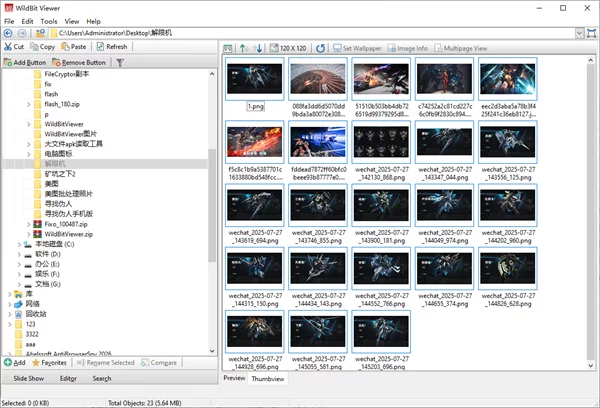
Key Features
1. Slideshow
Includes 176 different transition effects.
Offers "Normal" mode (using multiple folders) or "Custom" mode where you can adjust every detail: style, delay, background colors, and frame widths for each individual image.
Includes a list editor to build your own custom shows.
Desktop mode allows you to tile, center, stretch, or "smart fit" images to your screen.
Supports multi-monitor setups to quickly swap displays.
Displays detailed image info, including technical EXIF and IPTC data from your camera.
Switch images in order, randomly, or shuffled.
High-quality image zooming and hidden desktop mode for a clean full-screen view.
Includes a "Control Box" (a remote panel) to manage the show, plus rating and color tagging systems.
Supports multimedia files, Camera RAW formats, and remote control via a separate app.
2. Editor
Auto-adjust tools: One-click fixes for brightness, sharpness, white balance, and overall image quality.
Manual color tuning: Adjust contrast, HSV, HSL, RGB, and use Gamma correction or Sharpening.
Curves support: Compatible with standard Adobe (.acv) curve files.
Filters: Convert images to grayscale, negative, black & white, or use effects like "Lens," "Wave," and "Bump Map."
Tools: Merge selected images, remove red-eye, and capture screenshots of your desktop or specific windows.
Batch processing: Edit many photos at once (resize, rotate, convert formats, or apply colors) and save them as JPG, PNG, PDF, and more.
Layers: Supports over 100 built-in vector shapes for layering over your photos.
Touch-up tools: Includes Blur, Smudge, Pixelate, Clone, and Brightness brushes.
Wide support: Works with animated GIFs, multi-page TIFFs, and Camera RAW files.
3. Profile Switcher
Easily switch between the different modules: Viewer, Slideshow, Editor, Search, and Multi-Screen Viewer.
4. Multi-Screen Viewer
Opens multiple image windows across different monitors. Generally, the more monitors you have, the more individual image windows you can open at once.
Supports Color Management Systems (CMS) to ensure colors look accurate on every screen.
5. Slideshow Remote
A specialized tool to control your shows, display custom image info, and change playback settings (like shuffle or auto-rotate) from a distance.